VocalExchange Studio

Your vocal. A new voice. Still on your Mac.
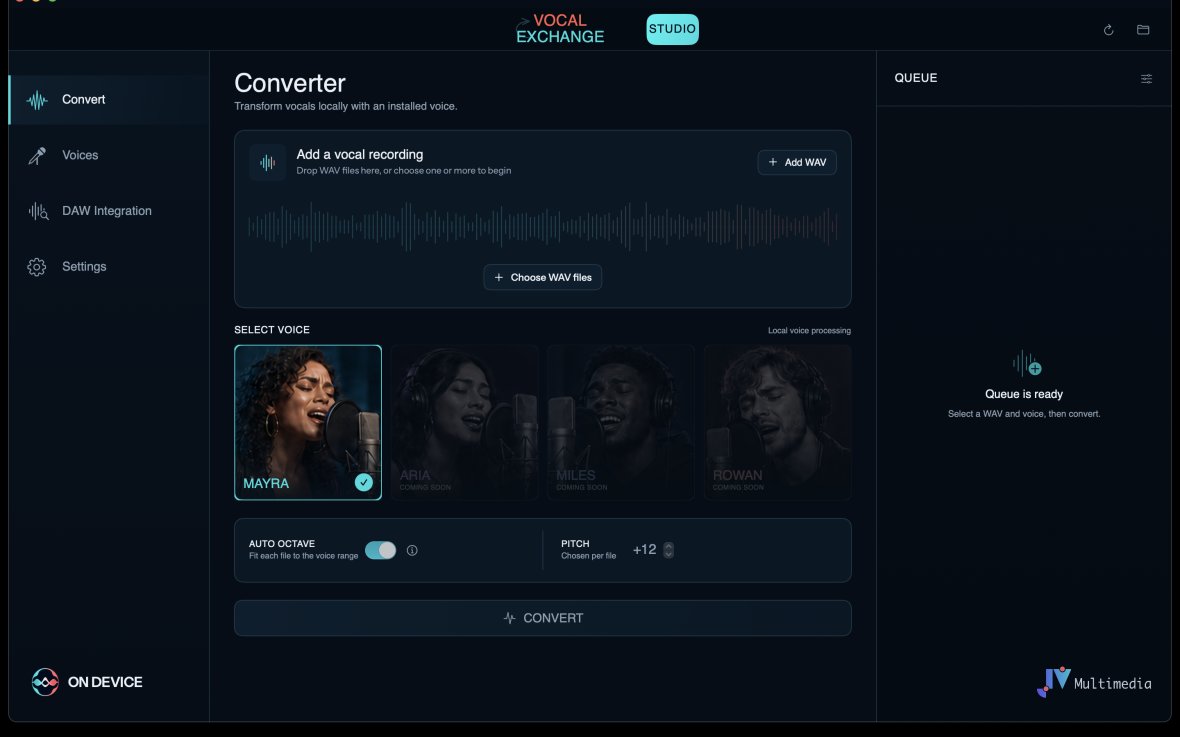
VocalExchange Studio transforms singing recordings with curated voices while the audio and AI processing stay on your own computer. Drop in WAV files, choose a voice, and let the native engine do the rest.
In development · Launch details coming soon
Made for vocal production
Fast from first take to a different character
The workflow stays deliberately simple, so the technology remains behind the music.
Your audio remains yours
Voice conversion runs on your Mac instead of uploading every vocal to a subscription service.
One file or a full batch
Add multiple WAV files, select a voice and keep working while VocalExchange processes the queue.
Pitch that fits the voice
Set pitch manually or use Auto Octave to place each recording inside the selected voice range.
Three clear steps
Drop. Choose. Convert.
Add your vocal
Drop one or more WAV recordings straight into the converter.
Choose a voice
Select an installed voice and use manual pitch or Auto Octave.
Collect the renders
Converted files stay available in a clear local queue and render folder.
DEVICE
A different model for AI software
Buy the tool. Keep using the tool.
VocalExchange Studio is being designed as a one-time purchase, without a mandatory subscription. Additional curated voices can be offered separately, while the core processing remains local.
What comes next
Standalone first. DAW integration on the roadmap.
The first release focuses on a polished standalone workflow for Apple silicon Macs. Audio Unit and VST integration will build on the same local VocalExchange engine.